A photo editor that keeps the work with the client
Adjust light and colour, mask the sky or the subject, and copy your look across a set. Edits are saved without touching the original, on whichever device you open it.
Every app included. From £29 a month after the trial.
How it works
Three steps
- 1
Bring in your photos
JPG, PNG, WebP, HEIC or TIFF, from your device or the asset library.
- 2
Adjust and mask
Start with Auto or go straight to light, colour, curves and grading; mask the sky, the subject or a gradient.
- 3
Copy and export
Save the look, apply it to the rest of the set and export JPG, PNG or WebP.
Before and after
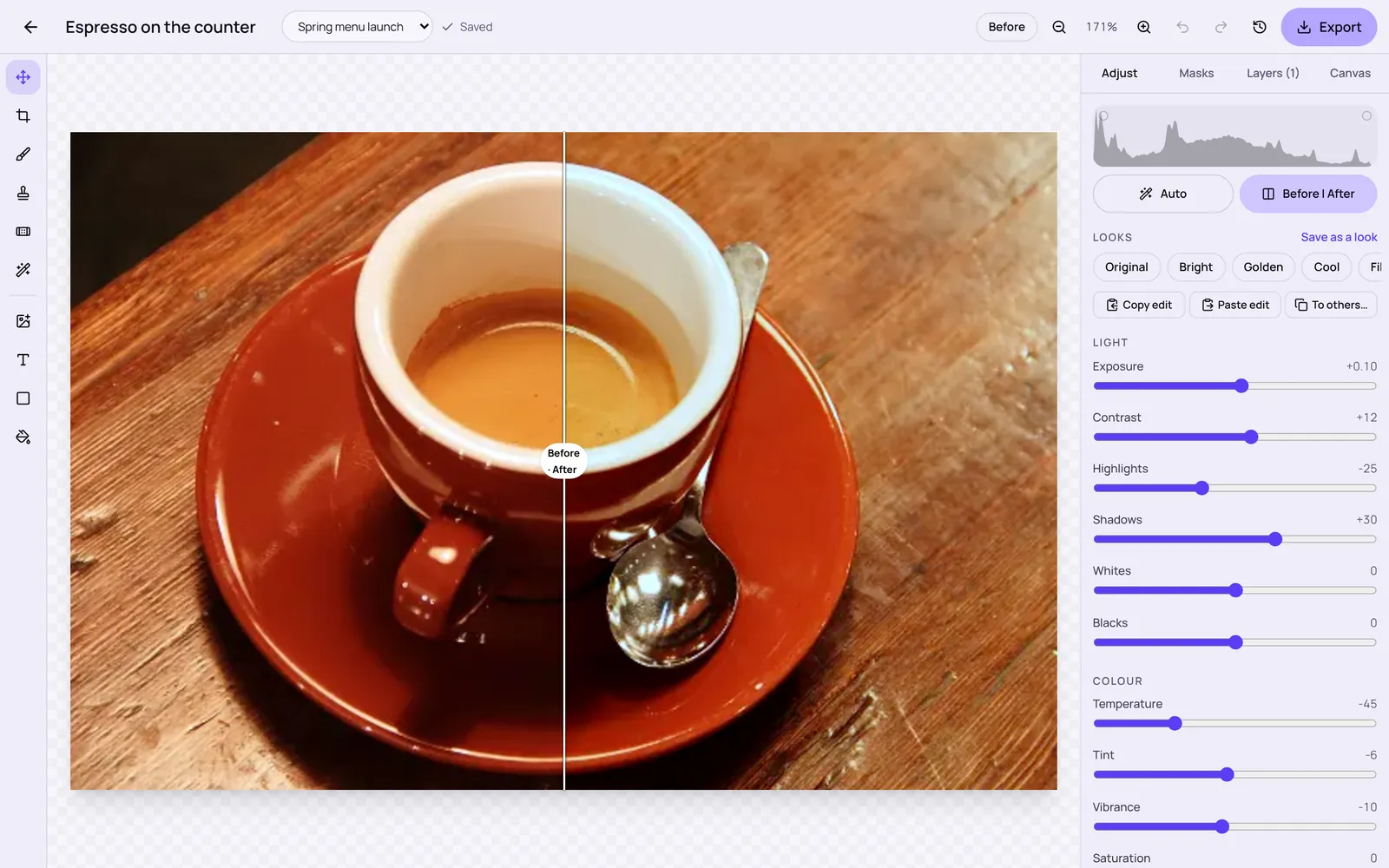
A real edit: the photo on the left is the original; the right is the file exported from Stydyo Photo after a cooler white balance, lifted shadows and softer highlights. Sample photo CC0, by Rachel Michetti.


What it does today
- Exposure, contrast, highlights and shadows, white balance, clarity, dehaze and texture
- Curves, colour mixer, colour grading and a live histogram
- Crop and straighten
- Masks for part of a photo: graduated, radial, brush, sky and subject
- Saved looks, and copying edits to other photos
- Layers, layer masks and retouching (heal, clone, magic wand) on the web
- Non-destructive: the original is always kept
- Open
- JPG, PNG, WebP, HEIC and TIFF (not camera RAW)
- Export
- JPG, PNG and WebP
Working by hand
Everything is manual and precise, with sliders, numbers and before-and-after. Auto gives a starting point you can change.
What Verity can do
- Verity doesn't edit photos yet. An AI cut-out is built but waiting to be switched on.
Connected to the rest of Stydyo
Where it works
In the browser: The full editor, including layers and retouching.
iPhone and iPad app: The same editor and the same photo on iPhone and iPad (in testing). Painting layer masks and retouching is on the web; the app shows them.
The iPhone and iPad app is in testing and isn't in the App Store yet. Everything works in the browser on a computer, tablet or phone today.
Good to know before you buy
- No camera RAW files yet.
- AI cut-out (background removal) isn't available yet.
- Painting layer masks and retouching works on the web only for now.
See it in a real workflow
Questions about Photo
Is it an AI photo editor?
No. Photo is a manual editor. Auto, sky and subject masks work on your device without sending the photo to an AI service. AI cut-outs are planned.
Do edits change my original photo?
No. Edits are stored separately, so you can go back to the original or change any setting later.
Can I edit a whole set the same way?
Yes. Save a look, or copy the edits from one photo and apply them to others.
What does it cost?
Every Stydyo app is included in both plans: Pro is £29 a month or £290 a year for one person; Business is £59 a month or £590 a year for up to 3 people. Try everything free for 7 days first.
Try everything free for 7 days.
Full access to every Stydyo app. Choose your plan and cancel anytime.
Start your 7-day free trialPayment method required. Your selected subscription starts automatically after 7 days unless you cancel.